First-month business admin: a practical routine
Your first-month business admin needs a repeatable way to record enquiries, agree work, track money and keep documents. You do not need a separate app for every task. You need to know what is waiting, what has been promised and what evidence supports each completed job.
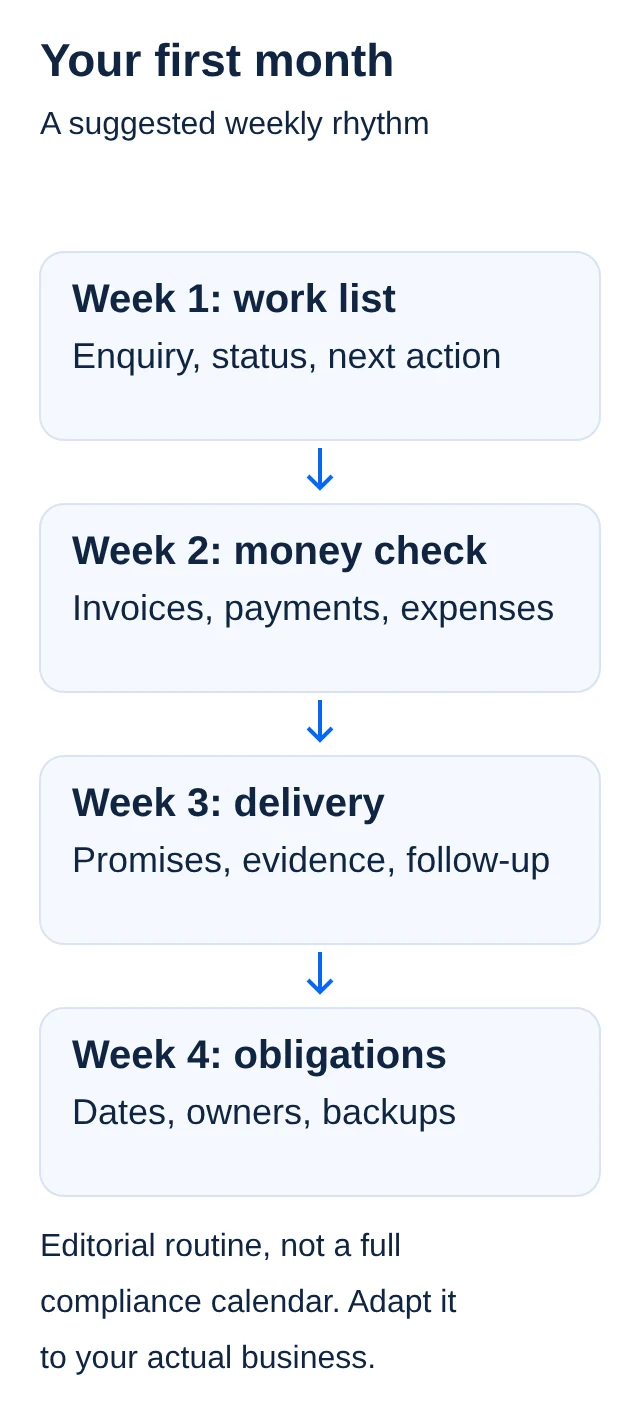
The routine below is an editorial starting point, not an accounting system or a complete compliance calendar. Adapt it to the business and ask a suitable professional about obligations you do not understand. The examples are illustrative and do not describe real Fimneo customers.
Do not wait until week four for a time-sensitive filing. CIPC says newly incorporated entities must file beneficial-ownership information within 10 business days of incorporation. Later changes also need timely updates. Its annual-return process requires up-to-date beneficial-ownership information and the applicable financial filing. Confirm the entity-specific requirements and keep the filing evidence; an annual tax return does not replace these steps.
First-month business admin: where should you start?
Choose a simple work list you will actually maintain. It could be a spreadsheet, a notebook or a tool with suitable access controls. Give each enquiry or order a reference, the date, a contact route, a short description, a status and the next action. Keep the list small enough to review without searching through multiple screens.
Use statuses that describe something observable. "Waiting for customer approval" is more useful than "almost done". A practical set might be new enquiry, quote sent, approved, in progress, completed and closed. Adapt the labels to your work instead of adding stages because a template contains them.
Separate a task from a promise. "Ask about available stock" is something you need to do. "Deliver on Friday" is a commitment a customer may rely on. Record who agreed the commitment and keep the supporting message or document. If the date is not confirmed, label it as proposed.
How do quotes, invoices and payments differ?
A quote records proposed scope and price. An invoice records an amount billed. A payment record shows money received. These items may relate to one order, but they are not interchangeable. Sending an invoice does not prove it has been paid, and a payment screenshot alone does not explain what was agreed.
Use the same order reference across the related documents. Record the quote version the customer approved, the invoice reference where applicable and the actual payment reference. If the scope changes, document the change before treating an extra charge as agreed.
Do not assume every small business should issue the same kind of tax document. Ask about the requirements that apply to your tax status. This routine helps keep evidence organised; it does not decide VAT treatment or replace accounting advice.
Week two: how should you check money?
At a regular time, compare recorded sales with the relevant bank or payment-provider records. Mark what is confirmed, what is awaiting settlement and what needs investigation. Keep a separate list of refunds, fees and disputed amounts so they do not disappear inside the sales total.
For example, an order can be approved but unpaid, paid but unfinished, or completed while a provider payout is still pending. Each situation needs a different next action. Avoid a single "done" tick that hides these differences. The online-payment preparation article explains why checkout, provider balance and bank settlement are separate stages.
Save expense evidence when it arrives. Give the file a useful name and link it to the relevant transaction where possible. A folder of receipts is more useful when you can connect each document to a date, supplier and purpose. Ask your bookkeeper how they want records supplied before creating a complicated naming system.
Week three: what needs delivery or follow-up?
Review the open work list and compare it with the promises made. Ask which jobs are waiting for information, materials, approval or payment. Contact the appropriate person with a clear question rather than sending repeated vague reminders.
When a job is completed, save the delivery or completion evidence that fits the work. That might be a collection confirmation, courier reference or approval of the final deliverable. Do not collect more personal information than the task needs merely to fill a record. Decide who can access customer details and keep sensitive documents out of shared general notes.
Record complaints and corrections as work to be handled, not as messages to hide once an order is marked complete. Note what was reported, the agreed next step and who owns it. A short record can help avoid asking the customer to explain the same issue again.
Week four: organise recurring obligations
List the registrations, accounts and services the business actually uses. Add the relevant renewal or filing date, the person responsible, the official source and the evidence needed to mark it complete. Do not copy a generic calendar and assume every entry applies to you.
CIPC's annual-return service says companies and close corporations must file annual returns each year. A CIPC annual return is different from a SARS tax return. Check the current requirements and due dates for your entity rather than assuming one filing finishes both.
SARS's August 2026 small-business guidance says taxpayers must retain financial, transactional and operational records. It describes retention of at least five years from submitting the return or declaration, with records kept longer when an audit or investigation remains unresolved. That summary is not a universal deletion date: ask SARS or a suitable adviser which retention rules apply to each record in your circumstances.
Who controls the accounts and backups?
Keep an account register with the service name, purpose, owner, recovery contact and renewal route. Do not put passwords into that register. Store credentials through a suitable secure method, and use separate user access where available. Remove access that is no longer needed when someone stops helping.
Choose a backup process for important working records and documents. Then test restoring a copy. Seeing a file name in a folder is not enough if nobody knows whether the file opens or contains the latest work. Keep a clear distinction between a current version and an older rollback copy.
Include the website in this routine. Check whether enquiries still arrive, contact details remain correct and important pages still work. The website launch checklist provides a useful repeat check after changes, not only on launch day.
Finish the month with a short review
Ask which enquiries became completed work, which tasks repeatedly stalled and which costs were unexpected. Use actual records rather than memory. This is a review of the process, not a claim that the first month predicts future income.
Choose one or two improvements for the next month. That might be a clearer quote, a better receipt folder or a fixed time to check payments. Buy another tool only when you can name the problem it solves and who will keep it up to date. A modest routine you maintain is more useful than a large system nobody trusts.
Official sources
Checked for this article on 13 November 2026. The weekly routine is an editorial suggestion, not an authority-prescribed schedule.