Accepting online payments: prepare your small business
Before accepting online payments, settle four things: what the customer is buying, which provider can support your business, what happens to the money after payment and how you handle a failed order or refund. A working payment button is only one part of accepting an order responsibly.
This is a preparation article for South African small businesses, not a provider ranking or financial advice. Provider rules depend on the account, product and payment method. Read the current terms for your own setup before committing. No payment service is selected or endorsed by this article.
Accepting online payments: is the order clear?
Write down the item or service, total price and what the buyer receives. Include delivery or other charges before the customer pays. If the work needs a brief or inspection, decide whether payment comes after a quote, as a deposit or after delivery. The wording on the page should match that process.
Do not use a checkout to settle an undefined scope. For a service, identify what is included, what changes cost and when the job is considered complete. For a physical product, check stock, variations and delivery areas. Taking money for something you cannot supply creates a problem that a payment provider cannot solve for you.
Keep a route for customers to ask about an order. Agree who monitors it and how an unresolved enquiry is handed over. A payment receipt should not be the last useful information the buyer receives.
What must the provider approve?
Check whether the provider supports your business type, products, country and intended payment methods. Ask what identity, business and bank documents apply to your account. Complete the provider's verification through its official process, not a link sent by an unknown person claiming to speed up approval.
For example, Payfast's merchant FAQ says its company, sole-trader and non-profit accounts need verification before accepting payments. That is a provider-specific example, not a universal document list. A successful sign-up screen is not enough evidence that every account feature or payout route is enabled.
If a developer helps with integration, keep the merchant account in the appropriate owner's control. Confirm the recovery contact and who can change bank details. Use separate access roles where the provider supports them instead of passing the main password around.
Which fees should you compare?
Ask about transaction charges, any fixed amount per payment, taxes on fees, payout charges, refund treatment and charges connected with disputes. Check international payments and currency conversion if those apply. Compare the payment methods your customers will actually use, not just the lowest number in an advertisement.
Use a sample order value and record the assumptions beside your calculation. Label it as an estimate until the provider's current schedule and your account terms confirm it. Do not assume that refunding a customer also returns all charges to the business.
Keep website development, hosting and payment-processing charges separate. They pay for different services. Ask whether an extension or integration has its own renewal cost. A simple worksheet with the source and date of each fee is easier to review than screenshots scattered across messages.
When does money become available?
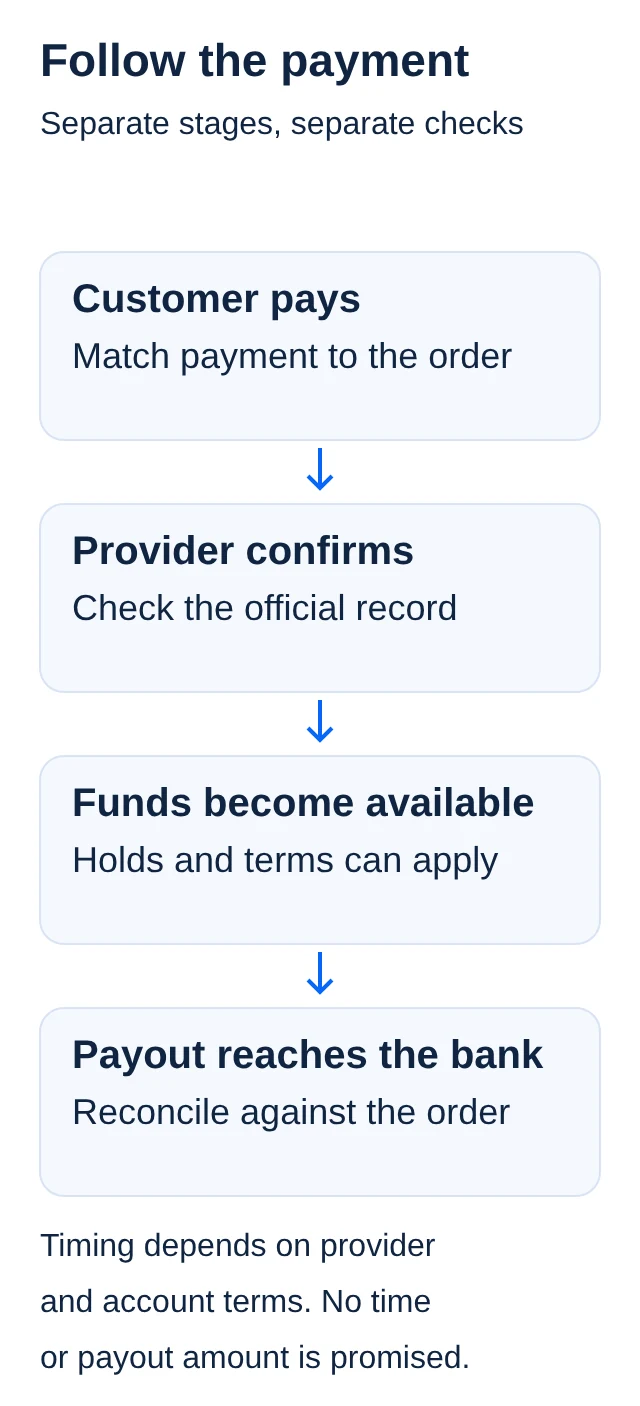
A customer payment, a provider balance and money received in the business bank account are different stages. Ask about the normal holding period, payout schedule, minimum payout and what can delay access. Do not promise a supplier payment based only on a checkout success message.
Payfast's FAQ, for example, describes an available balance after a withholding period and notes that a retained balance can apply to reduce fraud risk. Other providers and account products have their own rules. Read your own terms rather than treating another merchant's experience as a guarantee.
Make a cash plan for orders that need materials or delivery before settlement reaches the bank. Keep the order reference, provider transaction reference and payout reference linked in your records. That will help you investigate a mismatch without asking the customer for sensitive payment information.
How will refunds and disputes work?
Write a clear customer-facing policy that matches what you sell and respects applicable law. A provider's refund button does not decide your legal obligations. If you are unsure about returns, cancellation rights or a particular dispute, get suitable advice rather than copying another store's policy.
Find out how full and partial refunds work for each intended payment method, who may approve them and what the customer is told. Use the official transaction record to identify the original payment. Be cautious if someone asks for a refund to a different account or sends new bank details in a message.
Keep evidence of the order, the agreed terms, customer communication and delivery or completion. A refund is different from a chargeback or other payment dispute. Ask the provider how disputes are handled and which response deadlines apply to your account. Do not promise that submitting evidence guarantees a decision in your favour.
Keep payment data out of ordinary forms
Use the provider's supported checkout or integration and follow its security instructions. Do not ask customers to put card numbers, security codes or banking passwords into your enquiry form, email or chat. Keep ordinary order notes separate from payment credentials.
The PCI Security Standards Council says outsourcing payment processing does not remove a merchant's responsibility to protect account data. Some requirements may not apply directly to the merchant's environment, but the merchant still has responsibilities for the provider and shared controls. Confirm the compliance steps with the organisation managing your compliance programme, such as your acquiring bank.
Do not advertise a site as compliant simply because it redirects to a hosted payment page. Ask the integration provider to explain the actual setup, supported updates and responsibility split. Keep administrator access limited and review it when a helper leaves.
Test the payment process before launch
Use the provider's test environment where available. Check a successful payment, a cancelled checkout, a failed payment and the order notification. Confirm that refreshing a page does not create another order and that the business does not mark an unpaid order as paid.
If a real-money test is necessary, agree the exact amount, payment method and refund consequences with the account owner first. Test mode is not proof that a live merchant account is fully verified. Do not make an unapproved live charge simply to see whether the button works.
Use the website launch checklist for the surrounding customer journey. Then add payment reconciliation to the first-month admin routine. Launch only when you can explain an order from checkout through settlement, fulfilment and possible refund.
Official sources
Read on 13 November 2026. Payfast is an example of provider rules, not a recommendation; check your own provider's current terms.